

We are a digital agency helping businesses develop immersive, engaging, and user-focused web, app, and software solutions.
2310 Mira Vista Ave
Montrose, CA 91020

2500+ reviews based on client feedback
What's Included?
ToggleWhen it comes to storing our precious data, whether it’s family photos, important documents, or the latest video games, we all want to know that our storage drives are reliable and will stand the test of time. For years, the choice has primarily been between traditional Hard Disk Drives (HDDs) and the newer, faster Solid State Drives (SSDs). But which one actually lasts longer? It’s a question with a surprisingly complex answer, and it’s not always as straightforward as you might think. Both technologies have their strengths and weaknesses when it comes to longevity.
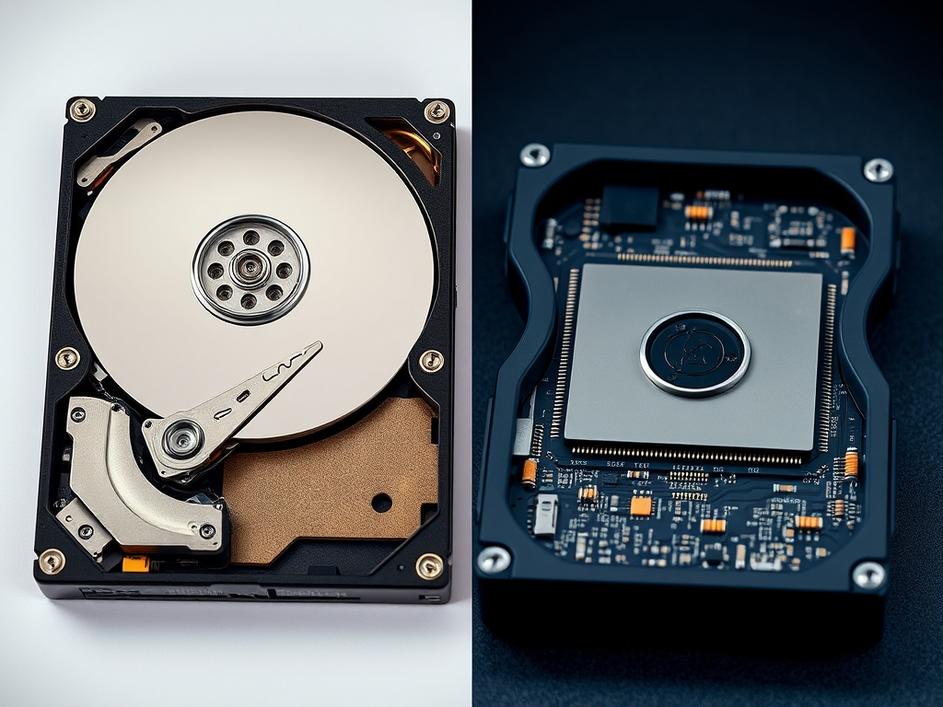
HDDs have been around for decades, and their technology is relatively well-understood. They store data on spinning magnetic platters, and a read/write head moves across the surface to access the information. Because of these moving parts, HDDs are inherently susceptible to mechanical failure. Bumps, drops, or even just normal wear and tear can eventually lead to the drive giving out. Generally, HDDs are rated with an MTBF (Mean Time Between Failures) which can be several hundreds of thousands of hours. However, this is just an average, and individual drives can fail much sooner or last much longer. Factors like the quality of the components, the operating temperature, and how frequently the drive is used all play a role.
SSDs, on the other hand, have no moving parts. They store data in flash memory cells, similar to the memory cards used in cameras and smartphones. This makes them much more resistant to physical shock and vibration. However, SSDs have their own limitations when it comes to lifespan. Flash memory cells can only be written to a certain number of times before they begin to degrade. This is known as the write cycle limit. Manufacturers use various techniques, like wear leveling (spreading writes across all memory cells), to prolong the lifespan of SSDs. But eventually, all SSDs will reach their write cycle limit and become read-only or fail completely.
So, which one lasts longer in real-world use? The answer is: it depends. For typical home users who primarily use their computers for browsing the web, writing documents, and watching videos, an SSD is likely to last longer. The lack of moving parts makes them more reliable in everyday use, and the write cycle limit is unlikely to be a major factor. However, for users who frequently write large amounts of data to their drives, such as video editors or database administrators, an HDD might actually be a better choice in terms of longevity. While HDDs are more prone to mechanical failure, they can handle a much higher volume of writes than SSDs before failing. Modern SSDs have become increasingly robust and offer impressive write endurance, but very heavy usage will still impact their lifespan. It is also important to consider the capacity of the drives. A larger SSD generally has a longer lifespan than a smaller one, simply because the write cycles are spread across more memory cells.
Ultimately, the lifespan of both HDDs and SSDs is influenced by a multitude of factors. These include the quality of the drive, the operating environment, how frequently it’s used, and even the specific workload. While SSDs have become increasingly popular due to their speed and durability, HDDs still offer a compelling value proposition, especially for users who need large amounts of storage at an affordable price. Regular backups are essential, regardless of the type of storage drive you use. By backing up your data regularly, you can protect yourself from data loss in the event of a drive failure.
The landscape of storage technology is constantly evolving. New types of memory, such as 3D NAND and Optane, are pushing the boundaries of speed, density, and endurance. As technology continues to advance, the distinction between HDDs and SSDs may become less significant. Solid-state storage is becoming more affordable and reliable every year, while HDDs continue to offer high capacities at competitive prices. Choosing the right storage drive ultimately depends on your individual needs and priorities. Consider how you’ll be using the drive, how much storage you need, and what your budget is. And remember, regular backups are always your best defense against data loss.
When making your decision, don’t just focus on the theoretical lifespan of each drive type. Think about your own usage patterns and the specific demands you’ll be placing on the storage device. If speed and responsiveness are your top priorities, an SSD is the clear winner. But if you need massive storage capacity at an affordable price and you’re not constantly writing huge amounts of data, an HDD might still be a viable option. The best approach is to weigh the pros and cons of each technology carefully, taking into account your own unique circumstances. And always, always back up your data!
In the end, the question of whether HDDs or SSDs last longer doesn’t have a definitive answer. Both technologies have their own strengths and weaknesses, and their lifespan depends on a variety of factors. While SSDs are generally more durable and resistant to physical shock, HDDs can handle a higher volume of writes before failing. The best approach is to choose the storage drive that best suits your individual needs and usage patterns, and to always back up your data regularly. The technology is always improving, the only constant is that data can always be lost.



Comments are closed